
Magento can compress cache entries before it sends them to Redis or Valkey. The setting is two lines in env.php, and on many shops it does nothing, because the default written by the installer switches it off. I measured the available codecs on the cache of a production Magento 2.4.7 shop and moved it to zstd.
Never keep sessions on the same Redis instance as the cache. A separate database number is not enough. A cache instance is sized to fill up and evict under maxmemory, and that limit covers every database on the instance, so eviction removes sessions too: customers get logged out and lose their carts. Redis runs commands on one thread, so a multi-megabyte cache read also holds up every session lock waiting behind it. Run sessions on their own instance with maxmemory-policy noeviction.
How compression works in Magento
Redis never compresses anything. The work happens in PHP, inside the cache backend, so the CPU cost lands on your PHP workers and Redis only sees fewer bytes.
Up to Magento 2.4.8 the backend is Cm_Cache_Backend_Redis. On every save it checks the size of the serialized value. If the value is at least compress_threshold bytes (20,480 by default), the backend calls a plain PHP function such as gzcompress() or zstd_compress() and stores the result with a short prefix: gz:, zs:, l4:, sn: or lz:. On load it reads the prefix and calls the matching decompression function. Two consequences:
- Every PHP runtime that reads the cache needs every codec that was used to write it. That includes the CLI and cron images, not only PHP-FPM.
- A missing extension is a fatal error (
Call to undefined function zstd_compress()), not a silent fallback.
The backend supports five codecs: gzip (always available through zlib), lzf, lz4, snappy and zstd. The last four need a PHP extension. If compression_lib is absent from env.php, the backend picks the first one it finds, in this order: snappy, lz4, zstd, lzf, gzip.
The default that turns compression off
bin/magento setup:config:set --cache-backend=redis writes this pair:
'compress_data' => '1',
'compression_lib' => '',
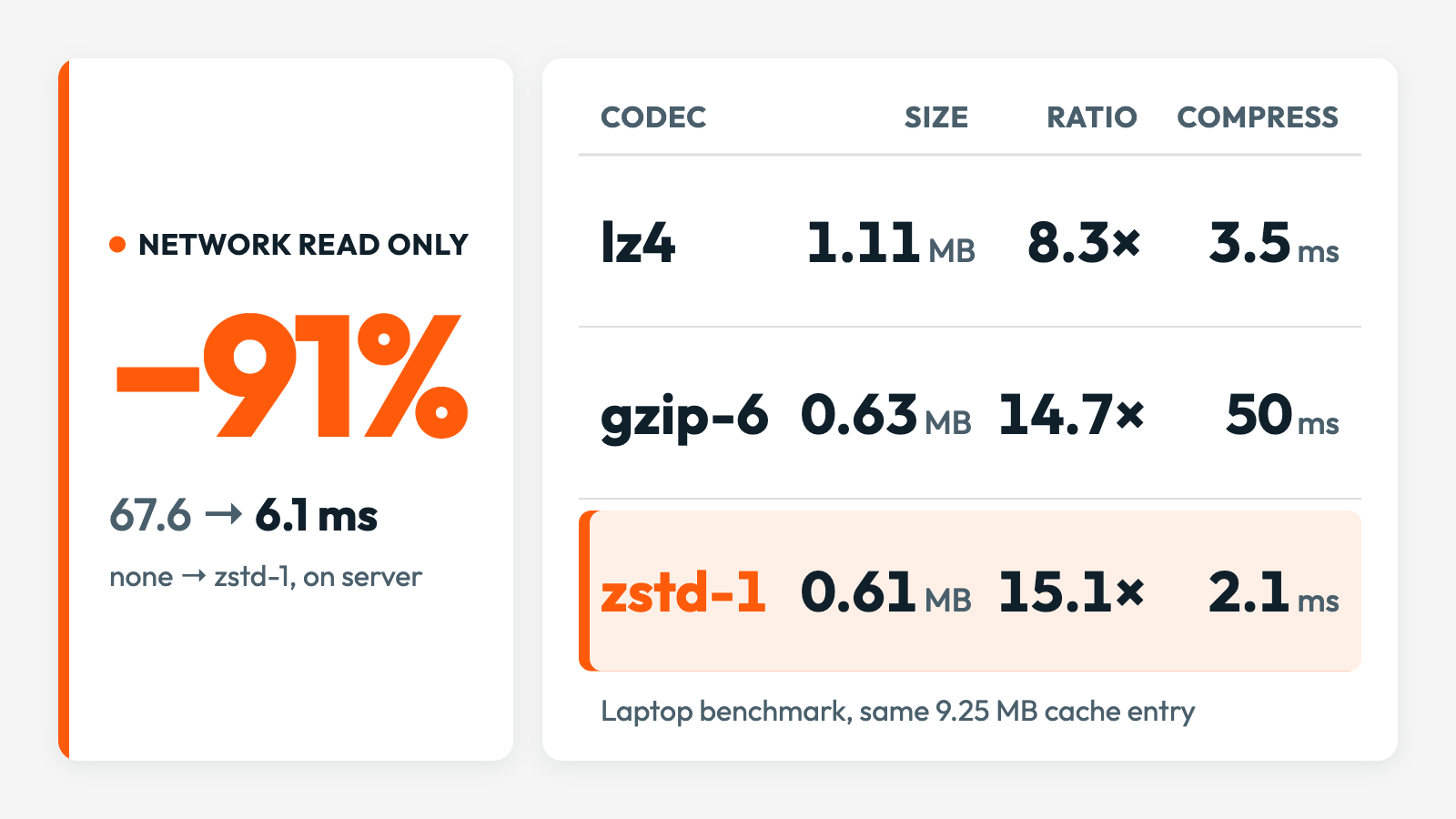
It reads as “compression on, library automatic”. In Cm_Cache_Backend_Redis an empty string counts as a configured value, so the automatic choice is skipped, and then the empty library name fails the check that guards compression. Every value goes to Redis raw. The shop I measured ran this way: its largest entry, the admin configuration structure, was stored as 9.25 MB and took 65–70 ms per read.
How the codecs compare
I dumped the 40 largest entries of the default cache (16.2 MB in total) and benchmarked gzip, lz4 and zstd on them. Snappy and lzf were not installed, so they are not in the table. Compression and decompression times are single-threaded totals for the whole set on an arm64 laptop. The production pods were slower, but the order between the codecs is what matters.
| Codec | Stored size | Ratio | Compress | Decompress | Estimated read of all 40 |
|---|---|---|---|---|---|
| none | 16.2 MB | 1.0× | – | – | 124 ms |
| gzip, level 1 | 4.1 MB | 3.9× | 79 ms | 14 ms | 98 ms |
| gzip, level 6 | 3.6 MB | 4.5× | 137 ms | 11 ms | 81 ms |
| lz4 | 5.3 MB | 3.1× | 5 ms | 1 ms | 55 ms |
| zstd, level 1 | 3.7 MB | 4.4× | 7 ms | 5 ms | 58 ms |
| zstd, level 3 | 3.4 MB | 4.8× | 8 ms | 4 ms | 53 ms |
The last column is an estimate for the measured setup: 0.38 ms per round trip, about 150 MB/s of effective throughput between a PHP pod and Valkey, and decompression scaled to the speed of the pod (gzip in PHP ran about four times slower there than on the laptop).
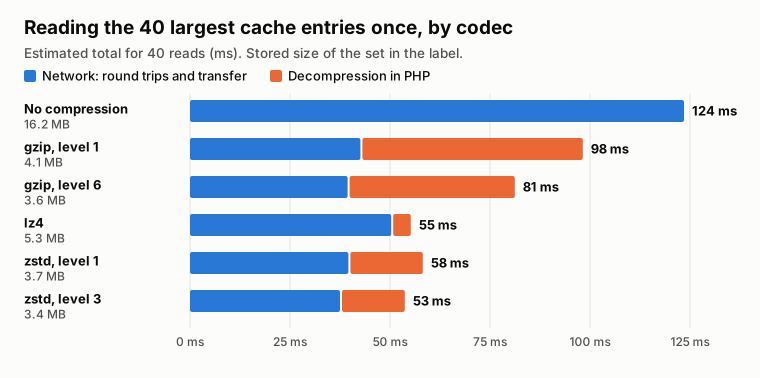
gzip saves network time and gives about half of it back in decompression. lz4 is the cheapest on CPU and leaves the most bytes. zstd at level 1 compresses like gzip at level 6, at about a twentieth of the write cost.
The totals hide large differences between entries:
| Entry | Raw size | gzip-6 | lz4 | zstd-1 |
|---|---|---|---|---|
| Admin configuration structure | 9.25 MB | 14.7× | 8.3× | 15.1× |
| Merged system configuration | 1.65 MB | 1.3× | 1.0× | 1.3× |
| Translations | 0.67 MB | 3.5× | 2.2× | 3.2× |
| Layout | 0.40 MB | 9.8× | 5.0× | 7.8× |
| EAV attributes | 0.16 MB | 16.3× | 9.2× | 14.8× |
The system configuration entries (SYSTEM, SYSTEM_STORES_*, SYSTEM_WEBSITES_*) are stored encrypted, and encrypted data does not compress. They are a fifth of the set and no codec helps them.
“Before” is production without compression. “After” is the stage environment of the same shop with zstd at level 1. Both are single reads from a pod on another node, with the same 0.38 ms round trip:
| Entry | Before | After |
|---|---|---|
| Admin configuration structure | 9.25 MB, 67.6 ms | 0.60 MB, 6.1 ms |
| Translations | 0.67 MB, 4.4 ms | 0.21 MB, 1.8 ms |
| Merged system configuration | 1.70 MB, 15.2 ms | 1.24 MB, 17.8 ms |
These are wire times. Decompression adds a few milliseconds for the largest entry.
Memory, CPU and network in the cloud
Memory. The 40 largest entries shrank from 16.2 MB to 3.7 MB, out of about 170 MB on the instance. 97% of the keys stay under the 20 KB threshold, so compression will not halve a managed node. It helps when the instance sits close to maxmemory, or when a release writes a second generation of the large entries under a new cache prefix.
CPU. Redis does no extra work: 26 µs per HGET. PHP pays, mostly on writes. On the production pod gzip at level 6 needed 113 ms to compress the admin configuration structure, while zstd at level 1 ran at more than 4 GB/s in the benchmark. Writes cluster after a deploy or a cache flush, which is the worst moment for a 100 ms save.
Network. Bandwidth between cloud services runs out. Smaller instances and managed Redis nodes get a baseline throughput plus a burst allowance, and once the burst is spent the link drops to baseline. Every round trip on it slows down, including sessions, queues and the database. Many workers reading multi-megabyte entries after a cache flush is a common way to get there, and traffic between zones is also billed ($0.01 per GB in each direction on AWS). This is where zstd’s ratio pays off: at 4.4–4.8× the same reads put less than a quarter of the raw bytes on the wire, against a third for lz4. On a congested link the ratio matters more than decompression time, so zstd at level 3 beats lz4.
How to configure it in env.php
Before you change env.php: the server or Docker image must support zstd first. That means the PHP zstd extension in every runtime that reads or writes the cache: PHP-FPM, the CLI and cron. Without it the old backend stops with a fatal error on the first large entry, and Magento 2.4.9 silently stores everything uncompressed.
Magento up to 2.4.8
'cache' => [
    'frontend' => [
        'default' => [
            'backend' => 'Magento\\Framework\\Cache\\Backend\\Redis',
            'backend_options' => [
                'server' => 'redis',
                'port' => '6379',
                'database' => '0',
                'compress_data' => '1',
                'compress_threshold' => '20480',
                'compression_lib' => 'zstd',
            ],
        ],
    ],
],compress_datais the compression level passed to the codec, and0disables compression. For zstd,1is enough.compress_thresholdis in bytes. Below it the round trip dominates and compression only costs CPU.compression_libacceptsgzip,lzf,l4z(the backend’s spelling of lz4),snappyandzstd. Never leave it as an empty string.
The same options work under page_cache if Redis holds your full-page cache. Sessions are separate: the Redis session handler supports gzip, lzf, lz4 and snappy, and has no zstd.
Magento 2.4.9
Magento 2.4.9 adds a cache layer built on symfony/cache. It is used when backend is the short name redis or valkey. A class name such as Magento\Framework\Cache\Backend\Redis still goes through the old backend, with the options above. On the new path Magento compresses in its own decorator and the option names differ:
'backend' => 'redis',
'backend_options' => [
    'server' => 'redis',
    'port' => '6379',
    'database' => '0',
    'compress_data' => '1',
    'compression_lib' => 'zstd',
    'compression_level' => '1',
    'compression_threshold' => '20480',
],compress_datais now only an on/off switch, and compression is off when the key is absent.compression_levelis new, from 1 to 9, and defaults to 6. Set it, or zstd runs at a level I did not measure.- The threshold key is
compression_threshold, notcompress_threshold, and defaults to 2,048 bytes. - An empty
compression_libnow means gzip. - A missing extension no longer fails on write. The value is stored uncompressed and nothing is logged, so check the result.
Verify and roll out
Check a large entry in Redis after the release. On the old backend the key is zc:k: plus your cache id_prefix plus the entry name:
redis-cli HSTRLEN "zc:k:<id_prefix>ADMINHTML__BACKEND_SYSTEM_CONFIGURATION_STRUCTURE" d
redis-cli HGET "zc:k:<id_prefix>ADMINHTML__BACKEND_SYSTEM_CONFIGURATION_STRUCTURE" d | head -c 3
Add -n <database> if the cache is not in database 0. The first command returns the stored size in bytes. The second prints zs: when zstd wrote the value. On the 2.4.9 path the key layout is different, so compare the memory used by the cache database before and after a flush and warm-up instead.
Ship the extension and the env.php change in the same release. Plan the rollback too: an older image without the extension cannot read entries written with zstd. Flush the cache on rollback, or use a cache prefix per build so each image only sees its own entries.
Takeaways
- Check that compression is on. With
Cm_Cache_Backend_Redis,compression_lib => ''disables it. - Use zstd at level 1 with a 20 KB threshold. It matched gzip level 6 on size and cost a twentieth of the CPU on writes.
- Expect the gain on large, repetitive entries: configuration structure, layout, EAV, translations. Encrypted system configuration does not shrink.
- Compression in Magento costs PHP CPU and saves network and Redis memory. Redis CPU stays where it was.